Disecting Perimeter X Fingerprinting
Working on an account generator for Walmart, I was running into some trouble with Perimeter X. For other sites, I had success with fresh chromium browsers launched with CDP then playwright would connect and inject the scripts I needed to run. That works fine for most of my needs, but their anti-bot was giving me trouble. Naturally, the first thing I did was open dev tools.
I noticed that one of the first requests made was a post request made to this endpoint:
https://collector-pxu6b0qd2s.px-cloud.net/api/v2/collector
As far as abstract naming conventions go, this one is obviously some type of sensor. Following that request, is a sequential one made to perimeter x once again.
https://collector-pxu6b0qd2s.px-client.net/b/g?payload=....
This request failed, so our payload contained something that triggered a challenge. Going back to the collector, I decided to check the initiator and check the call stack. We stop at this block of code where the payload is sent.
try {
    var m = sp(e.postData);
    e[Rn] && (Mu = fi()),
    h.send(m)
Looking at this block here, I suspect that sp(e.postData) is some sort of encoding step right before the payload gets sent. Then visiting the sp function, we see that is just appending a counter parameter and not doing any real encoding, so that likely means that the payload is already encoded by the time that we reach e.postData.
function sp(t) {
    return t += "&" + ma + ++lp
}
I need to see where this data is being encoded so I set an XHR breakpoint on URLs containing collector to get a clean trace. Refreshing the page, we stop at the same h.send(m) line, but the call stack is much clearer now.
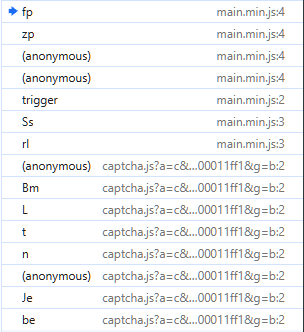
Up in the call stack, we stop at this line here:
return fp(t, qp(t), cg, og, ng, ag, $p)
zp constructs the object and then passes it to fp, by this point postData is already built in t.
t = {PX561: true, postData: 'payload=aUkQ...', FrON: true, ...}
So this means that we need to go up in the call stack again, this time to (anonymous).
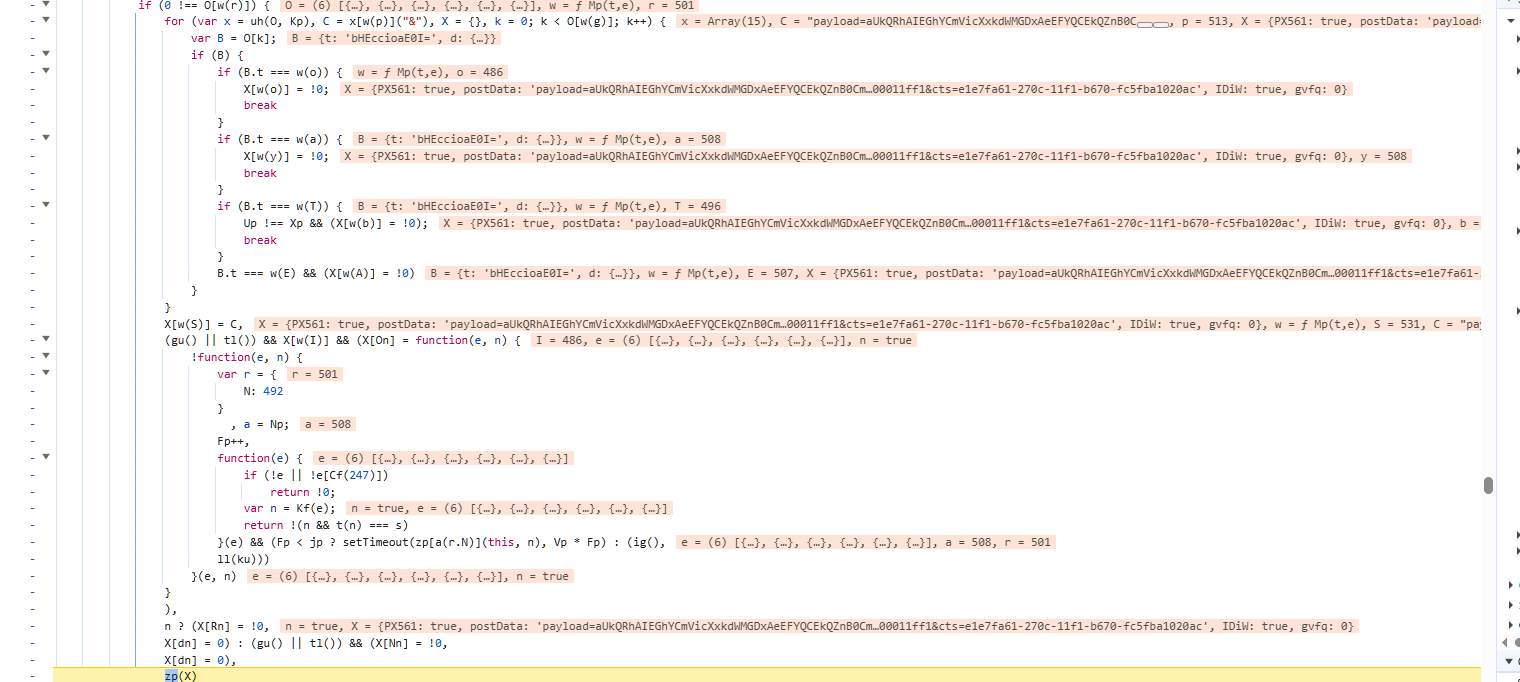
We stop on this ugly chunk of code which looks eerily like a command dispatcher, so we’re getting into some real logic here. We can see that we’re iterating through an array of command objects O, matching on B.t and then calling Mp(t,e) to build the payload for each one. The key line is at the bottom in which zp(X) is called, where X is our object being built through the loop. So at this point, postData is already set on X before zp is called and we need to look at where C is assigned, as that is our encoded payload string.
for (var x = uh(O, Kp), C = x[w(p)]("&")
Deciding next to look into the uh function, we arrive here.
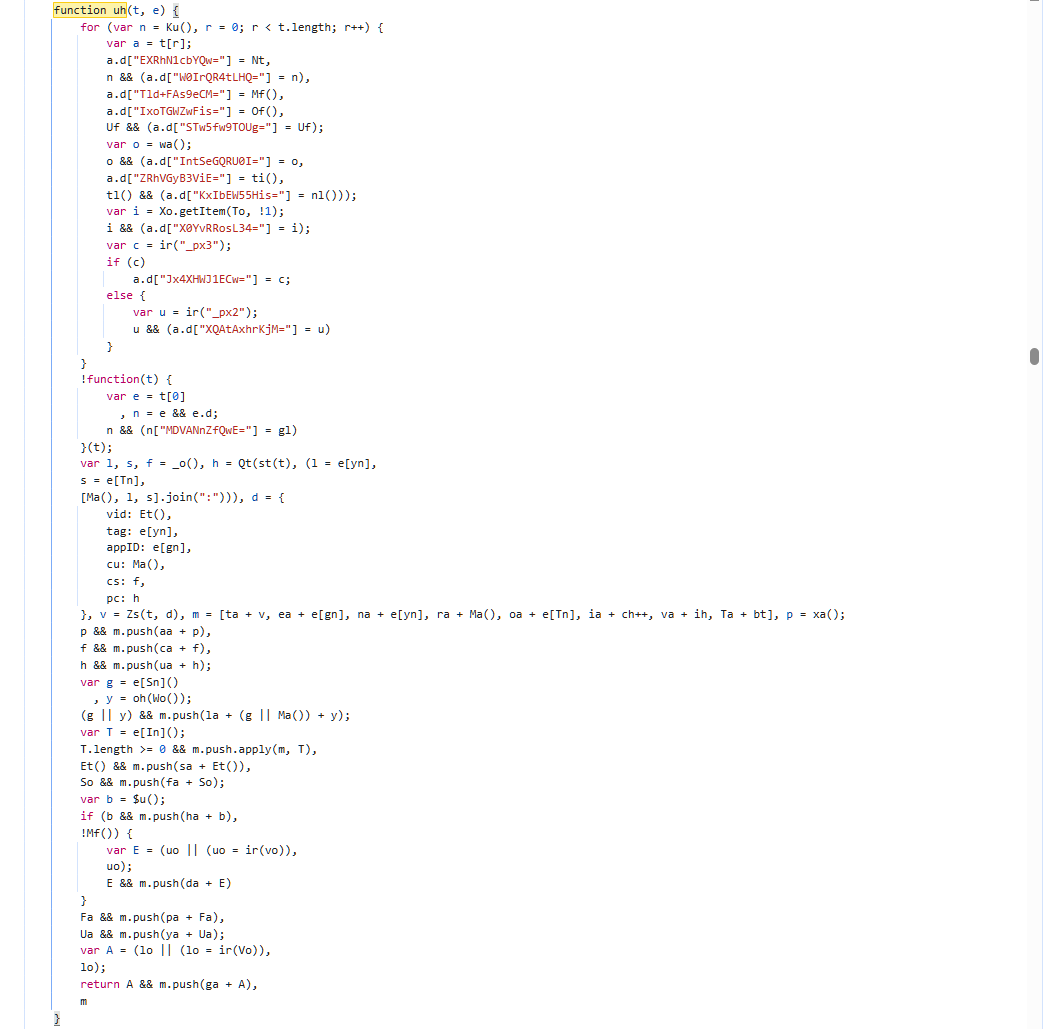
Now we’re at the core of the payload assembly function. The top section enriches each data object a.d with additional fingerprint values like our px cookies, session data, etc. All the encoded keys map to fingerprint properties.
This line here, var l, s, f = _o(), h = Qt(st(t), (l = e[yn] I assume serializes the collected fingerprint array t into a string. Zs(t,d) likely encodes the serialized data with the metadata in d, and v becomes the encoded payload blob that gets prepended with ta.
I want to see the raw fingerprint data before encoding so I set a breakpoint here:
}, v = Zs(t, d), m = [ta + v, ea + e[gn], na + e[yn], ra + Ma(),
oa + e[Tn], ia + ch++, va + ih, Ta + bt], p = xa();
and inspect t.
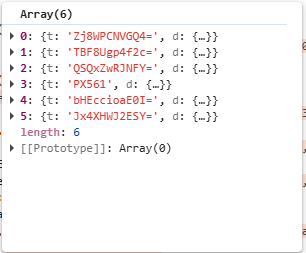
We now see that t is an array of 6 data collection objects where each one has a t and d property.
All of these are base64 encoded and the values are the actual data collected from my browser.
This data isn’t really useable in this format, so we decided to stay paused at the aforementioned line and dump it using this command.
t.forEach((item, i) => console.log(`--- Item ${i} (${item.t}) ---`, JSON.stringify(item.d, null, 2)))
The data obtained with this method had all the values, but a lot of the keys were still obfuscated. Some of these keys could be inferred, while others came from the obfuscated source code. Below you can find an interactive tool that uses a lookup table to decode the keys if youd like to try for yourself. Already in there, is array[1] of my browser fingerprint. Not all keys are present if you decide to decode items 5 and 6 (or 4/5 with a 0 index). Additionally, this is for PX SDK 2.7.7, so these values could very likely change in the future.
As I mentioned at the beginning of this post, this fingerprint analysis was a tangent from my goal of automating account creation. I get why anti-bot’s exist, to stop things exactly like this. Without them, sites are susceptible to a variety of malicious attacks. This is expecially important in the age of AI. But on the other hand as you can see, they often rely on extremely agressive fingerprinting tactics and judge whether you are human enough. With privacy focused browser like Brave, or smaller browsers that arent mainstream, sometimes these methods result in false negatives. I worry that they could eventually push the web into a state where only certain browser/OS combos pass these checks.